Endless loops
Turn on Loop and the progression keeps going until you stop it. Change chords or patterns and you hear them on the next pass.
Acoustic Guitar Track plays your progression the way a guitarist would: real chord shapes, strums that sweep across the strings, fingerpicking, and the small human wobble in timing and touch. Use it on your songs, or as an endless backing track to jam and practise over.
Windows 10 / 11 · Standalone app + VST3 plugin · Instant download before or after checkout
How it works
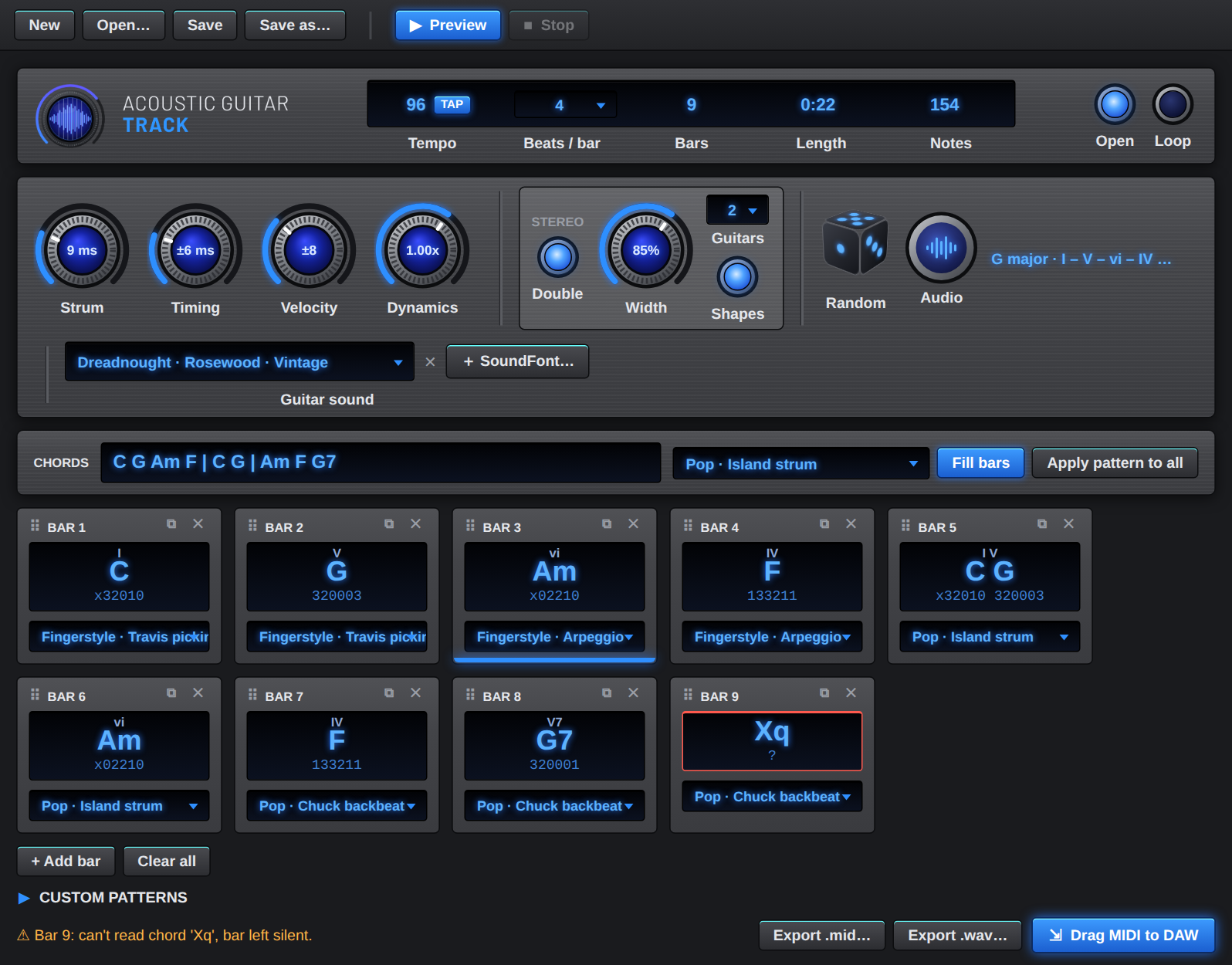
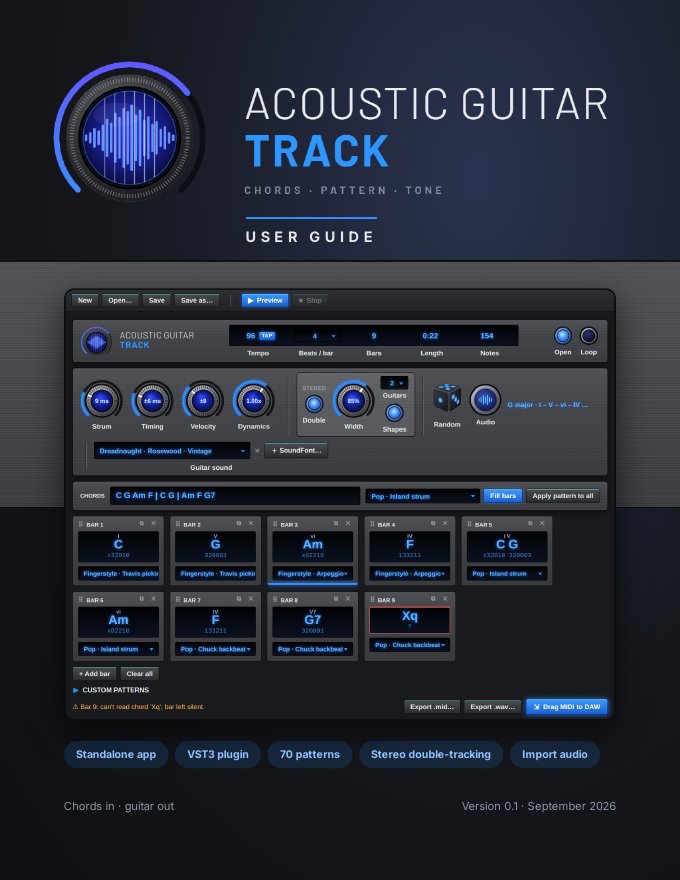
Enter a progression like C G Am F. Each chord becomes a card that shows the fingering it will play. Drag cards to rearrange, or roll the die for a fresh progression.
Choose from 70 strum and fingerstyle patterns, set the tempo (or tap it in), and shape the performance with the Strum, Timing, Velocity and Dynamics knobs.
Hear it instantly through a modelled guitar, double it across the stereo field, then export MIDI or WAV, or drag the part straight onto a track in your DAW.
Jam & practice
Grab your own guitar and play along. Acoustic Guitar Track makes a steady rhythm part in any key, at any tempo, for as long as you like. Solo over it, work on your scales, learn a new strum, or try out a melody for your next song.
Turn on Loop and the progression keeps going until you stop it. Change chords or patterns and you hear them on the next pass.
Slow a part right down while you learn it, then bring it back up to speed. TAP in the tempo of a song you're working on.
Roll the die for a fresh progression in the key and scale you want to practise: major, minor, Dorian, Mixolydian or harmonic minor.
Every chord card shows the fingering, and rolled progressions label each chord with its Roman numeral (I, IV, V, vi…), so you see which shapes to play and why the progression works.
Double-track the part with two to four guitarists across the stereo field, so there's a full rhythm section behind your lead.
Export a WAV backing track and play along from your phone, tablet or any media player: at home, in lessons or at rehearsal.
Want a full band? Drop the part into your DAW as MIDI or audio and add a drum loop and bass underneath.
Every pattern is written out stroke by stroke in the manual. Learn the strums the app plays, then play them yourself.
Features
Every chord is voiced with a real fingering: open shapes or barre chords, from triads to maj7, sus, add9 and diminished.
Pop, rock, folk, country, blues and jazz, reggae, funk, Latin, ballads, 3/4 and 6/8, and fingerstyle. You can also write your own patterns.
Strum speed, timing looseness, velocity variation and overall dynamics. Downbeats land a little stronger, just like a real player.
Roll the die: choose a key, scale and complexity (basic, intermediate or advanced) and get a musical progression built from real phrases.
Two, three or four guitarists, each playing their own take, spread across the stereo field with a single Width knob.
Ten built-in modelled guitars need no sample library. Import any .sf2 SoundFont to play your favourite recorded guitar.
Standard MIDI files, drag-and-drop MIDI clips, and dry WAV audio at 44.1, 48 or 96 kHz in 16-bit, 24-bit or 32-bit float.
Tap tempo, drag-and-drop chord cards, several chords in one card, a glowing highlight on the bar being played, and looped preview.
New · Import audio
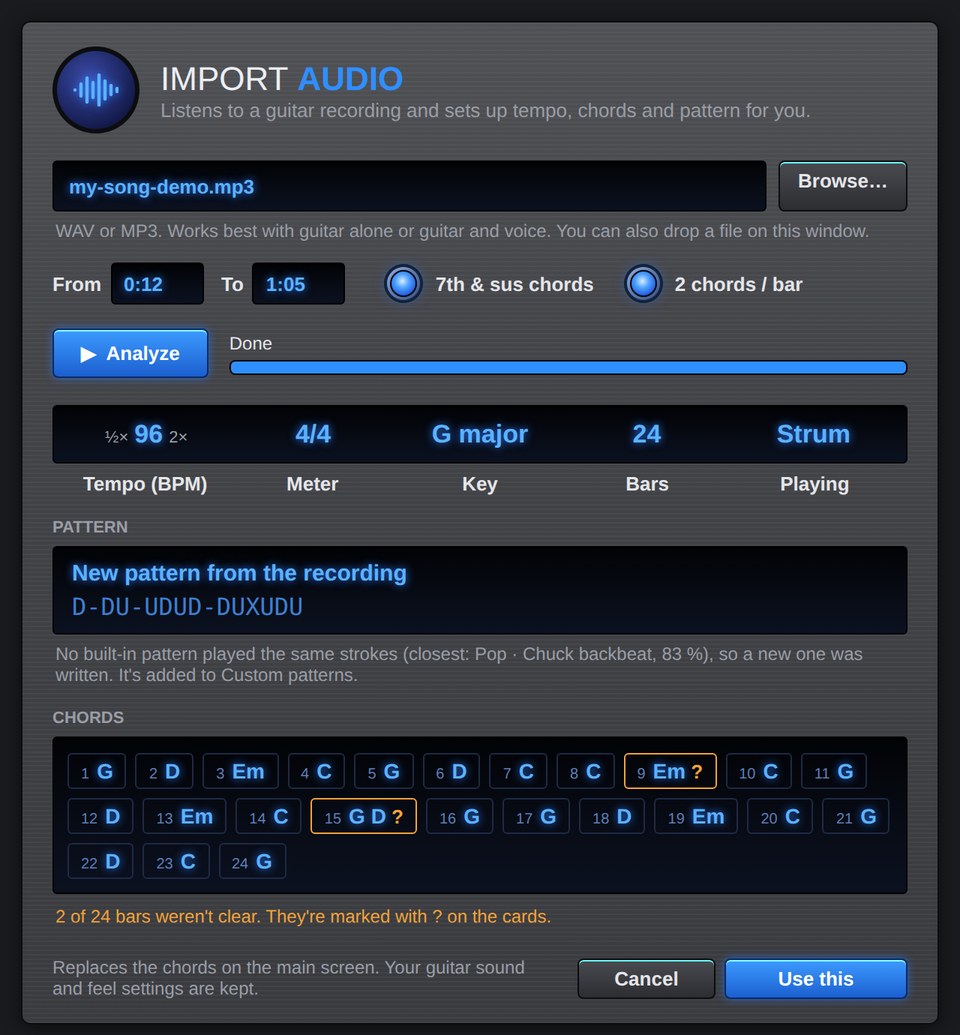
Drop in a WAV or MP3 of a song you want to play. Acoustic Guitar Track listens and sets everything up for you: the tempo, the time signature, the key, a chord card for every bar, and the strumming or picking pattern.
Works best with guitar alone or guitar and voice at a steady tempo. It plays the part with its own guitars; it doesn't copy the recording's sound.
Listen
Straight out of the app: no reverb, no effects, no editing.
A short song played by the Dreadnought · Rosewood · Vintage model with the default feel settings.
The same part as one, two and three guitars, with a SoundFont guitar and fingerpicking. Jump to:
Every built-in model in turn, from the rosewood dreadnoughts to nylon, archtop and clean electric.
Guitars
The built-in guitars are physically modelled: each string vibrates on its own, and the body and tonewood shape the sound. They need no sample library and load instantly.
Want a particular recorded guitar? Click + SoundFont…, choose any .sf2 file, and its guitar presets appear in the menu, ready for preview, WAV export and the plugin.
The built-in sounds are synthesized profiles of guitar types, not recordings of particular branded instruments.
Stereo double-tracking
Studio producers record an acoustic part twice and pan the takes apart. Flip the Double switch and Acoustic Guitar Track does the same, with up to four players.
Standalone and VST3
Pricing
Standalone app + VST3 plugin · Windows
Secure checkout by Stripe · cards and wallets
Not yet. Acoustic Guitar Track runs on Windows 10 and 11 (64-bit).
No. The ten built-in guitars are modelled and need no samples. You can add SoundFonts (.sf2) if you want a particular recorded guitar.
After you have paid, download and install the software if you haven't already done so. You will be prompted to generate a code and email it to us (support@acousticguitartrack.com). We will then issue a special activation key for you. In your email, please provide the full name and email address you used during checkout so we can identify your payment.
Yes. When you run the installer, Windows SmartScreen may show a blue "Windows protected your PC" message. It shows this for new software that Windows hasn't seen many people install yet. It doesn't mean a virus was found. Click More info, then Run anyway, to continue the installation. If you have any doubts, contact us before installing.
Yes: Import audio listens to a WAV or MP3 and sets up the tempo, key, chords and strumming or picking pattern. It plays them with its own guitars (it doesn't copy the recording's sound), and it works best on guitar alone or guitar and voice. Unclear chords are marked so you can check them.
No. You get a raw, dry guitar track, ready for your own mixing chain.
User manual
A 41-page illustrated guide with a clickable table of contents and an index. It covers every control, how strum patterns are written, the feel knobs, random progressions, importing a recording, guitar sounds and SoundFonts, stereo double-tracking, exporting, and using the plugin in your DAW. The full pattern library is in the appendix.
Open the user manual (PDF, 2.6 MB)Contact
Ask about features, licensing or your order, or tell us which patterns and guitars you'd like to see next. We usually reply within a couple of working days.